Thursday, 24 October 2019

Everstone Capstone Project: THE CONCLUSION

By now, everything that needs to be in the game has been added. Before building my game, I made sure to run a few bug tests. This resulted in doing some minor art fix ups where the asset had been cutoff in Krita and not drawn as well as fixing + adding some colliders such as the player collider and the colliders of the arches since I had split the sprites in two. (this was so that the player would appear in front of one side of the arch but appear to walk through the arch with the front part covering the player if that makes any sense) 

Quick reflection time!

Overall I have learnt many things from this project. My choice to pick this task for myself was due to my joy of 2.5D games, I have always wondered and admired about them. Doing this project has not only enlightened me with the supposed processes to create these games but has always given me a newfound respect for just how much work is needed to make a whole game based about the concept of parallax and 2.5D. It is extremely taxing and hard work that requires a lot of thought and time to finish and I admit I was foolish to believe in my own art skills so much in the beginning. I think I was pretty over ambitious with my intentions for the final project and as a result serious cut downs were made within the semester to just get one polished level up and running. In future, I believe now that I have a better understanding of just how much time is needed to fulfil a single level. But overall, I have really learnt so much about 2.5D games and how to do so much more in Unity. 
Completed Level layout

Everstone Capstone Project: Character Design and animation

Yep, this took a while to complete I'd say, I personally acknowledge that I am not very good at character design etc beforehand. 

As a conceptualisation starter, I made sure to create a fully detailed character sheet before creating a spine 2D compatible design of a smaller size. This was all done and drawn in Krita. I wanted the character to still have a modernish yet adventuresk look to him
Geoffrey character sheet
As soon as this was done and completed I downsized the character and simplified it to be ready to use in spine 2D to animate. 
Knowing that I needed to animate the character I made sure to keep everything piece of the character on a separate layer (which was the right choice)


Just as I had done with the rest of my art, I exported this into photoshop to run a script to trim all the layers and pack a .json file for me to take into spine 2D. As it was my first time properly using Spine 2D I had to watch some tutorials to create a simple walk and idle animation. The animation is a little shabby but it was the best I could do at the time. 


As soon as the animations were finished I brought the spine files into Unity to connect up with the required scripts in order to run properly. Finally, after all this time I could remove the original player prefab I had! 


Everstone Capstone Project: Unity work part IV

Short update, I have added sound to my game. 
Made sure to find royalty-free sound to use from purple planet sound and free sound.

I tried to add a footstep sound to the player but it was atrocious when in action so removed that.
Game now has a looping background sound that plays on both the menu and level, key collected sound, button hover and clicks sounds, player death sound and a *very* quiet jump sound.

To ensure things played correctly, I made a SoundManager script and applied all the right code to the areas in other scripts needed while referencing back to the manager. 

Everstone Capstone Project: Unity work part III

To bring more life to my environments, I have added in some lights to my project.
At a first glance, when adding in lighting into a 2D unity project it does not seem to affect the imported sprites at all. 

After a little research and watching this tutorial: https://www.youtube.com/watch?v=fwyAoE_uMFo  I found that there was a way to allow unity lighting to appear. Since I did not have too much time left, I decided to only apply this technique to some things in the level such as the statue. By following along the tutorial I was able to make the statue light up with a point light. This was achieved by creating a clipping mask from the drawn asset and colouring it white, before importing both the asset and its mask into unity. Within unity, I followed through with the process by creating a new material and attaching the mask to it.

In addition to this, with the help of increasing and lowering the alpha channels of the light and the unity animator, I was able to animate the light to pulse. 


This same light effect was added to a set of keys that I added into the game as part of a collection system for the game as suggested by my lecturers. 

The keys I took inspiration from the logo I created and drawn and coloured in Krita.

When a player collects a key, the script will update the amount collected on the canvas overlay with the player icon. 


Tuesday, 22 October 2019

Everstone Capstone Project: Unity work part II

As much as visuals are important for my project, so is the user interface.
When I was happy with the setup of my scene, I decided to create all my user interface assets including my main menu. 

I decided that I wanted my main menu to be a completely new scene within unity so I decided to head back in Krita to draw this up. Prior to starting the final production phase of this project, I had already drawn up a piece of concept art for the main menu which I followed for my final main menu design. 

Main menu original concept art


Final Main menu design with UI buttons and moveable character

For my game, I made a grand total of 3 different UI screens out of canvases, buttons, images and animation. 

The first UI was simply the main menu which allows the player to test the controls of the character as well as a title logo of the game that I drew up in Adobe illustrator. It also has buttons that highlight on click/hover. Each button is coded to do what they intend to do via a script. 

I also took the time to make a pause and game over screen using similar elements and prefabs from the menu. When Esc is pressed the pause overlay comes up and freezes everything in the scene and when the player lands on the spikes in the scene the game over screen will come up. As a major point to my project isn't to focus on mechanics, everything is relatively simple and is really only there to demonstrate simple game mechanics.


Everstone Capstone Project: Unity work Part 1

As soon as my art assets were done I imported them into photoshop and exported from layers to files which would trim down each asset so I could import for use in Unity. 

Learning from my first and second prototype, I made sure to change my camera setting to Orthographic to ensure the assets weren't resized by unity in order to parallax. I also made sure to attach the correct scripts to each layer as well as the camera in order for the fake parallax to work. 

Just like my workflow in Krita, I made sure to keep my project layout organised by assigning names to everything in the project window. In continuation of project housekeeping, I also created and assigned tags for each of the different layers as well as assigning draw order numbers to each layer to control what would appear in front of or behind of each layer. 


When I had set everything up in the level, I added an empty game object labelled "Hitbox" which holds colliders for the ground the player would walk upon. Originally when drawing I had not intended to start the player on a high point in the level map but after a while, I referred back to the original concept in my level design to spawn the player start on the top of a hill in front of the statue. When everything was in order, I added in the red square player prefab to the level with the working controls to start testing the colliders and parallax of the level. 
Hitbox path highlighted in green

While setting up the level assets, I, of course, ran into many technical issues due to the number of layers. One notable example I found as I walked through the game was that from starting higher in the level and coming down the mountain, the hills would appear too high in the game view despite placing them logically in perspective. I managed to fix this (as well as most of the other visual problems through trial and error, in this case I simply moved the hills lower in the project view till it appeared correctly when running. 


Before (incorrect)
After (correct)


Everstone Capstone Project: Final asset creation

Following my art struggle, between writing the narrative and level designing for the project, I explored different program alternatives as suggested in my one on one feedback. I knew prior that I was not comfortable to work in photoshop for illustration so I decided to try a program that I have had for a long while now but have never really used much - Krita. 

At first, I was pretty reliant on my natural drawing style with a lot of linework within the first few assets of my level. Since I had referenced the same structure in my GDD I decided to make that the starting point of my asset creation since I knew what to draw. 

Tintagel ruins: Photo taken by me
Krita work layout
For most of my level, I decided to take reference from parts of what I saw at Tintagel, keeping the flow of the level a mix of environmental assets that I fabricated together through drawing and real parts. While doing this, I made sure to follow and reference the level design I had made. My workflow overall was to work on a segment of the level each day with each frame starting from a base sketch -> linework -> colouring -> shading/lighting

As I trudged on with the rest of the level asset creation, the number of layers increased day by day and became a little difficult to manage and keep track of. I was thankful that I had made sure to name each layer I had created which kept chaos away. What is also noted is that I have most definitely over scoped, among life and the scheduling of this project I have underestimated just how long it is taking to create just the environment. To just draw at every waking moment has been seriously unrealistic. By the time I had finished all the assets (without doing art fixes yet) that alone has taken around 3 weeks, leaving me with not the biggest amount of time to complete every I had set out to do. For this reason, this is where I decided to cut down the number of levels I would make from 3 -> 2 -> 1, an interactive menu screen and no more cut scene. 


Everstone Capstone: Narrative and Level design

As a short pitstop, I decided it would be incredibly useful for the future of this project to write a simple narrative to aid in character design and level finalisation. 

Below I have included the narrative I have written for this project which introduces the character of the game and the situation he is thrown into. I have left the details of the character vague except the gender to give me more design freedom when it comes to it but enough to begin painting an image of the character. 

Everstone Narrative:

Cast and Characters:

Main Protagonist:
-          Sex: Male
-          Name: Geoffrey
-          How: Stumbles across the ruins of the castle, almost drowns in Merlin’s cave at the base of the hill.
Merlin:
-          Spirit that inhabits the mysterious statue
-          Guard of the sword of Arthur
Ideas for gameplay:

-          Platformer
-          Fight enemies when navigating levels – Creations of the Necromancer, shadowy, grotesque?
-          History: Legendary King Arthur kills his own son Amr = King Arthur turns to necromancy and kills his own son who tries to stop him – The fallen forefather, for plot this is the main protagonist’s ancestor, Arthurian blood line hence he can pull Arthur’s sword from the stone.
-          Collect soul pieces? By killing monsters. Soul pieces reveal where the necromancer is through memories at ends of some levels.
-          Play area is the castle ruins, level one navigates down from the cut scene area?
-          Another level can be the ancestors tomb?
-           

They often say that when you are about to die, your life... all your achievements, the people you love and your happiest moments flash before your eyes as the world goes dim and darkness takes you. Perhaps I should’ve taken it as a sign when this did not in fact happen at all. I remember it as clear as if it were yesterday, the fall, the splash of the water encasing my body, the endless blue fading as my lids were forced shut by the sheer force of the cave dragging me in.

The blackness seemed to go on forever but like all things it ended and presence returned to my body once more. Oddly, water was now replaced by what felt like dirt and the cold embrace now replaced with a light warmth. I winced as I began opening my eyes, not expecting to see the grey overcast sky above me. ‘Where was I exactly?’ groaning in fatigue I forced my tired limbs up but before I was able a voice crept through the air around me. Looking around, I notice a shadow of a figure on the floor beside me cast by statue that I did not notice in my presence. The features of the old hooded man chiselled into the granite feel as if they are calling me and my curiosity betrays me as I find myself moving closer to inspect the statue. “Geoffrey son of the cave...” the voice called as I came closer. I am not a brave man and would run to the hills at the sound trouble, but I found something entrancing about the stone face, “Who’s speaking? And how do you know my name?” I answered.
Eerily the voice fell silent and the only reply was a quiet grumble and shifting of rocks as the earth beneath me shook causing me to fall to my feet. The area in front of the statue that was once flat, was now replaced with an ancient stone harbouring a long-forgotten sword. The sword, much like the statue felt like it was calling to me, getting up once more I brush the dust off the sword and touch the hilt lightly causing it to emit a dim light. “Grasp the sword and seize the light, avenge the fallen forefather” the voice whispered as I pulled, the old rock gave way releasing the mysterious artefact. Stumbling backwards with the pull my energy draining with me as a series of flashbacks filled my head before darkness once claimed me again. “Avenge the fallen forefather...”
EVERSTONE                                                                                                                                         

With this narrative, I have decided on my level design and made a rough sketch of it to get a better idea of what assets I needed to create for the level itself. This, of course, does not necessarily show everything I will need to create for the level and is subject to addition and change. I felt it was necessary to step to my design process to first write this narrative before even starting on final asset creations. 
Level 1 rough design

Everstone Capstone: Prototype No.2

Moving from my simple first grey box prototype with the rough vector diagrams representing my assets, I have found it troubling to visualise my environments due to how simple grey boxing is.

For my newer prototype to test my parallax environments better I opted for rough sketches instead. The problem with this is that it took more time to do which I know is going to take precious time from the rest of my project. It is becoming a concern to me that I am stuck in the Paint tool SAI program with my art. I have realised that in order to achieve better results I will need to push myself to find more advanced programs and find a workflow I am comfortable fast after this completed prototype. 

Paint tool SAI layout


Similar to my first prototype, I made sure to attach the ParallaxLayer script to every individual asset. Drawing has been challenging as I have become more aware with the rough sketched prototype that I must draw everything even if I can not see it in the initial placement of the asset. Drawing so roughly is already taking so long, I am beginning to believe that I have really over scoped my project. To save as much time as I can, I have decided that my next step will be to just start drawing up my final assets.

Everstone Prototype 2 in Unity

Thursday, 6 June 2019

Week 5: Critical reflection

For this week I created my prototype for my capstone project. Due to time and the fact that it is a prototype, I created some rough vector layers in Photoshop before importing them into the game.
By creating scripts and assigning them to the different layers as well as creating a virtual camera that follows the player, I was able to test and create the desired parallax effect. I was aware that I could've used a different camera type to create this but did not like the fact that it created parallax by resizing and scaling all my art assets. 
Overall this test went well for the most part and provides a good insight for what to expect. While the art is currently flat and vector-like, this effect should run nicely once I get proper art into the levels. The only trouble I ran into when making this prototype was the player controls, as the script I was making had animators for the character (which I didn't need at this time) the player refused to move horizontally. This was fixed when I deleted the lines of code associated with the animator.


Game journal: FEZ


For my final game journal, I will be reviewing FEZ more specifically its perspective mechanic. 
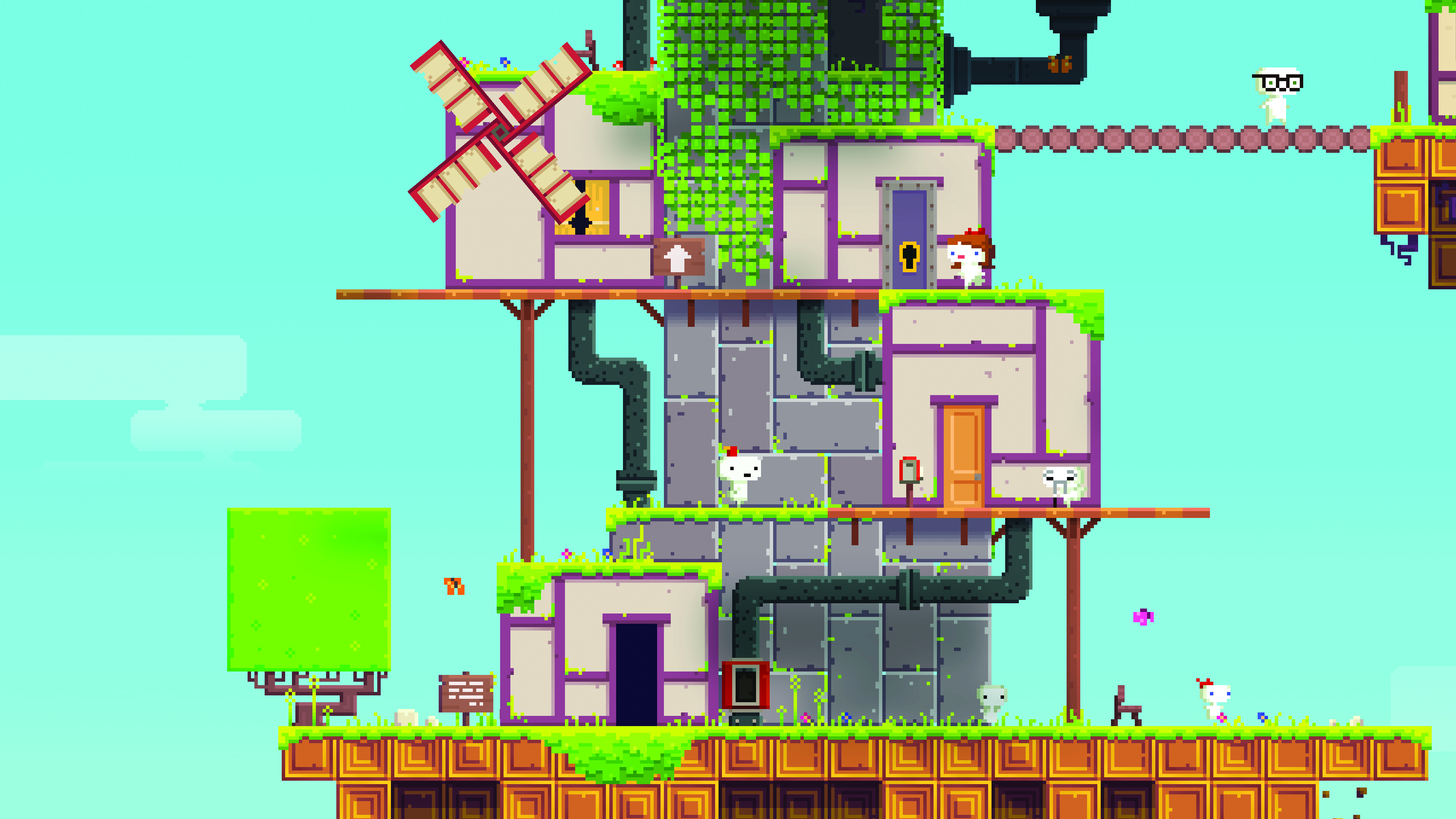
FEZ is an indie game built around the character Gomez and his adventure in a 2D world with 4 sides to it. The game makes use of this interesting concept by making the player rotate this 2D world to navigate, reveal the hidden and solve puzzles with. This unique camera work is very interesting and adds a layer of complexity to this 8bit game as it forces players to think outside the square. Literally. 
This game was very challenging when playing and is certainly worth a play for anyone who hasn't. To add another layer of difficulty, the player is sometimes required to rotate the world in the right other for certain puzzles to reveal things. 

Image result for fez game

Wednesday, 29 May 2019

Week 4: Critical Reflection

Despite many different activities going on this week, I continued on with my pursuit of game design completing some more concept art as well as the game design document. 

Coloured concept of the main menu screen
Coloured concept of the intro cutscene
Currently, the quality of the art is okay for the concept art but will need to improve for the final project in my opinion. The water, in particular, is something that I will need to work on as well as improving the shading, colouring and texturing of rock. 

Preview of GDD

Tuesday, 28 May 2019

Game journal: BIT TRIP Present Runner 2: Future Legend of Rhythm Alien


For this week's game mechanic review I decided to look at one of my old favorite's, BIT TRIP RUNNER 2 a rhythm based game built around a continuous runner obstacle course.
The mechanic I found the most interesting in this game would have to be fundamental base of audio. It is interesting as everything within the obstacle course appears and happens in relation with the music thus affecting the player's response. On top of this, the music forces the player to remember the order of obstacles as well as enemy behavior. This mechanic can be tricky as sometimes music can work unexpectedly, such evidence of unexpected can be found in real life orchestral pieces where melodies can end and change much to our surprise causing us to believe that the orchestra have completed the piece. 

But the idea of music within the game is not so simple, it is interesting how the pieces of music can stay the same for every level but as the difficulty level is changed the game adds in more obstacles, sometimes occurring in off beats throwing off the player. What also makes this harder is that each obstacle is beaten different in respect to different controls.


Friday, 24 May 2019

Week 3: Critical Reflection

For this week, I added more to my mood board for my sword inspirations:
I realised before I drew the swords in pencil that I had not updated my mood boards hence their appearance now. While looking at the player's weapon, I focused in particular on the handle as well as blade design. The charts I found were a good reference for this.


As well as updating my mood boards this week, I also finished digitalising the rest of the pencil sketches among everything else happening. By drawing these out I am able to get a better feel of the sword choices with the colours. 


On top of creating the swords, I have been making more progress on my Game design document. As I am doing a game focusing more on the art rather than the mechanic side it was a bit hard to find a starting point though I figure what better way to start than to touch upon my layering concept. In the coming week, I will collect together and digitise my game document. 

Game Journal: Trine 2


For this week's mechanic review I have chosen to look at one of my all time favourite game series, in particular, Trine 2: Complete Story. Besides its beautiful character and environment design, the Trine trilogy includes a very interesting base mechanic which the whole game revolves around: the ability for the player to change between three different characters. This is an interesting aspect as you are faced with playing through the game, solving puzzles and defeating enemies along with way with essentially three different classes of character types. The catch with this is that each character has each their own set of exclusive skills which are needed with different types of obstacles. Alongside with their own skills, each character also has their own health bar which depletes with damage as guessed. Upon the health bar running out, the player is unable to change into that character anymore, forcing them to either restart the level, reach a checkpoint or deal with the level with their remaining characters which provide a bit of a challenge. Often in games players are given the choice to play solely as one character so it is very interesting to see a game embrace the ability to change characters mid-game to play. This ability also makes multiplayer games all the more challenging as players have to take turns to change into the free character (if there are only two players) or work together with each player set of abilities to proceed. It is not until playing multiplayer do you really appreciate the ability to change into all 3 characters by yourself, especially when playing with others that are uncooperative or simply not as good at the gameplay. 

Amadeus the wizard: activated by pressing (1)
Abilities: Creating boxes, levitation of objects 
Zoya the thief: activated by pressing (2)
Abilities: Archery, grappling hook 

Pontius the knight: activated by pressing (3)
Abilities: Sword/Melee combat, Shield (can be used to glide and block), Charging, Hammer (can be thrown)  

Saturday, 18 May 2019

Week 2: Critical Reflection

For this week, I began conceptualising my art. It was a bit frustrating wrestling with programs to find what was comfortable to use. Hence a rather poorly drawn environment concept as the first piece.


I took a breather with this and thought I had better conceptualise a few weapons to choose from to decide what to actually use in the first scene of the game/ the weapon that the player would use. These were first sketched in pencil. 


Following this, I started to colourise a few of these swords before having to complete other tasks for the week. I am planning to finish the rest of these in the upcoming week. So far I am already liking the first 3 that I have done. These were all done in Paint tool SAI - an art program I am more accustomed to. All these swords are based on real sword types with a touch of fantasy thrown into them.  

Wednesday, 15 May 2019

Game Journal: Crypt of the Necrodancer

Game Journal review of this week's game:

Plague Inc: Evolved


Chosen design element focus: Music, the games fundamental mechanic


For many games, music/soundtrack is what brings the games to life- often when we play games with no audio it feels almost wrong. This game is no different but utilises this simple concept and makes it its own. When you play the game you are already introduced to this fact from the heartbeat on the screen as pictured above. This heart is synced with the game's soundtrack and only allows the player to move on the beat, dungeon crawling as they go collecting items, to defeat mobs.
To play this game without audio would be very difficult despite the visual guide on screen as the player is forced to really pay attention.
The music also forces the player to complete/leave stages as when the music finishes the player will be forced to go to the next stage costing them their coin multiplier. 
Different mobs have their own movement patterns and without paying attention to this the player will suffer for it, and in fact, ignoring the music as a whole will cause extreme failure.

To add onto this mechanic the game rewards the player for keeping beat streaks. 

- Effects multiplier weapons/torches which will give you higher attack damage or area of sight
- Keeping a continuous streak keeps the coin multiplier high as well, rewarding the player with more loot to spend to buy items at the store on each level. 

The change of soundtrack of each zone/level creates a sense of difficulty as the tempo becomes faster/shorter, introducing new harder mobs unique to each zone.